Sunday, April 10, 2011

Caution: Deadline ahead

Two weeks ago I introduced my latest undertaking of selling software components. I have been pretty busy since then finishing some contractwork which is also why I havent any interesting news yet regarding ultramarine-ui.

What I want to write about today is the power and misery of "Deadlines". Originally I always hated Deadlines since I rather enjoy working without time pressure. A good product needs time and care. Since I work more and more on my own projects though I feel I need timelimits because otherwise projects tend to drag on or won't get done if it's not an important project.

"Deadlines - 165/365" by tranchis (via flickr)

I had two projects this year I got out of the door in almost no time because I set myself a tight deadline after I felt that my motivation to finish off the project was slipping away. The deadlines worked. With both projects I had to face a few bugs though shortly after release. The first version of our game Gem Hunt had issues with GameCenter and my new site which is hosted on my own server went offline for a few hours.
In both cases I could sort out the issues and everything was fine shortly after.
Still, it's not the best impression people get of your product is it?

Conclusion

The lesson I think I should learn here is that a tight schedule can increase productivity but comes with risks at the same time. For my next project it probably makes sense to pick a rather tight deadline only for a certain fetureset, not for the whole deal. After all features needed for release are done I shouldn't worry about taking a few days more to ensure that the product is flawless and works as planned. I also feel that after working on projects myself for weeks and weeks i'm not that motivated to do a thorough test before the release. Furthermore, there's no way I could find as many bugs as someone who is either a real QA guy or is at least not as biased as I am. Hiring someone just for a few hours of final testing might be worth investing in.

What are your experiences with deadlines and final testing before release? How do you do it?

Sunday, March 27, 2011

Becoming an Entrepreneur: Change of Direction

How I got here

Almost two years ago I started my undertaking to make games for the appstore. The main reason for this was that I always wanted to make games for a living and the appstore surely made the impression that this was possible. I was also a bit frustrated with my day job back then and I had this shiny iPhone 3G in my pockets that wanted more attention. So yes, the time was right.
That's when I started working on my first to be published game ever with my friend Markus. Roughly 4 months later we launched the game.
It got some good coverage around the internet and was featured by Apple but after all it didn't really sell enough to cover the costs. Also I moved from New Zealand back to Germany which basically meant that whatever budget I had was gone. Since then I still work on games but most of the time i'm busy contracting to make a living. This brings me to the status quo where i spend about 80% of my time in contracting and 20% in making my own apps while 98% of my income still comes from contracting.

Photo by Mr__Fox: "Sailing in the Fog"


Becoming an Entrepreneur
Besides just making games cause i enjoy doing it, more generally put, i want to become an entrepreneur and use my own creativity and work on my own projects. So how do I get there?
I could just work a few months on another app and hope that this will change my time and income ratio towards my goal to become an entrepreneur.
But is that the quickest and most reliable way to reach my goal? Is that my strongest suit? While thinking about this question I realized that there are other possibilities to use my skillset that might get me quicker to my goal. The answer I came up with was:

Creating tools and components for iOS Development

Inspired by @gaminghorror with his line-drawing starter kit and Dr. Touch with his Parts Store I decided to change the direction of my business for a while and focus on creating tools and components to make a living and help other developers to accelerate their app development process.

Introducing ultramarine-ui

I spend quite a bit of time in the past weeks on my new site ultramarine-ui.com that will be the home of my components. While the main focus right now is on UIKit view components i'm also thinking about creating some tools to speedup iOS game development. There's a tool for cocos2d i have in mind but more about that in another post.

First components

The first component i'm selling is a teaser view with nice animations that is great to showcase a set of products. On top of that i built another component - a more-apps view - for iPhone apps that uses this teaser component to showcase a set of apps. I guess a few people will find that the price tags are quite high but I had a look on other sites selling source components and i didn't feel like dumping the price on my first day so please bear with me.


Free & Open Source Software

Even though i haven't got anything free for download on my site right now i will definitely look into releasing some components for free or putting something on github.


Let me know what you think about my new site and the new direction. Would be great to get some feedback.
(In case you are interested in my components you can follow me and/or @ultramarineui for occasional product updates).

Sunday, March 13, 2011

Picking the right Tree

I'm currently reading 4-hour work week by Timothy Ferriss. The chapter The End of Time Management starts with a bold statement:
"Just a few words on time management: Forget all about it."
Then he illustrates that productivity cannot be measured by the pure volume of work you do and that it's about figuring out what parts are most important to achieve your goal. Makes sense, right?
I have my problems relating to this philosophy when it comes to indie game development.
While I think it's possible to cut out a few things in a game that aren't necessary for it to be fun and profitable, there is still plenty that cutting out is risky or simply impossible. In the end there will be a lot of tasks that inevitably need to be done to make the game work and fun.
Still i believe there's a lesson to be learned there.

Looking at my last two game projects I can say that I
was working quite efficiently but I also know that I could have finished both projects in less time.
I must admit though i'm not too worried about getting my next project done in less time. I'm more worried about the outcome of the next project, since my last two games weren't really that profitable. They wouldn't have been profitable in even half the time. I would even go so far and say that even the best marketing wouldn't have made them profitable.
That's where the difference between Efficiency and Effectiveness comes in which Ferris also emphases in his book.

Let's have a look at Wikipedia's definitions for both terms:

Effectiveness means the capability of producing an effect, and is most frequently used in connection with the degree to which something is capable of producing a specific, desired effect.

Efficiency in general describes the extent to which time or effort is well used for the intended task or purpose.

In terms of capability of producing the desired effect: a fun & profitable game, I think both game ideas and resulting concepts/prototypes were only capable to produce the desired effect to some extent.
This leads me to the conclusion that with my next project I'd like to spend more time on effectiveness - the right idea and concept - before worrying about realizing it in an efficient manner.

So yes, sharpen your axe before you chop down a tree but also think twice about what tree you are picking.

This article is part of the #idevblogaday initiative. Be sure to check out the other articles on idevblogaday.com.

Tree photo courtesy by Till Krech

Sunday, February 27, 2011

Postmortem: Into The Blue SD

Welcome to our first #iDevBlogADay post in which I want to revisit our first game Into The Blue SD. It is in the appstore by now for about 2 years more than one year. So it's about time to figure out what went right and wrong and what things can be learnt for the future. Let me illustrate what the process was like.

The Beginning
The idea for the game was obviously influenced - as you probably expect - by the game Flight Control. It wasn't our intention to make a clone in space, we just thought it might be cool to make an RTS/Action title that is playable on a small screen and is as easy to understand and pickup as FlightControl with a bit more to do than directing spaceships.
As newcomer indie developers we didn't know much about prototyping so we immediately started with development.
The game idea was the following: Topdown view on the surface of a planet. Base in the middle. Player has to land transporters to top up weapons. Enemies attack the base. Fight them off. Hiscore++
Sounds simple right?

Early Concept Art

Little did we know
We both soon realized that it wasn't that simple afer all. There were heaps and heaps of design decisions to make: Should the transporters crash into each other while landing? At first: yes => Frustrating. Then: don't collide within range of the base => Confusing. Finally: No collision at all=> Better.
Should you be able to draw lines or touch and shoot torpedos? Should the number of torpedos be limited and if you don't bring in transporters you can be out of ammo? Unlimited ammo?
Game over when a transporter is shot or can the base be destroyed?
You got the picture.

Crossroads
About 2 months later and lots and lots of design decisions later we had the game done. You had to land transporters at your base and blast away incoming enemies. That's it. You get hiscore++ once you shot an enemy and it was game over once a transporter was down.
We found that the game was "ok" and maybe "fun", but we weren't amazed about it[2]. Markus had ideas to add more levels (or missions as they are called within the game) with different objectives to make it more interesting. I didn't like the idea at first since I knew that those missions also meant a lot of work and yes: scope creap. Also I wasn't sure adding more would pay off and make it a better game after all. I can't remember anymore what the thought process was like but in the end we decided to give it a go and add more missions. Probably because the gameplay felt too flat and repeatitive.

Missions
We started out with about 10 missions in mind and for reasons that are unknown to me now, I decided consciously against crafting a level editor for that. Instead I had some sort of base level class that could be extended to fit different scenarios and different game over conditions. It didn't take long to bring the missions to life but it took ages to polish them and adjust the difficulty to be right. After 6 missions were finetuned, we felt that it was time to get the game out of the door. We had been working on the game for 5 months straight and just couldn't do it anymore. We didn't have a clue, if people would like the game anyway so why adding more missions? So we went ahead and added a survival endless mode and OpenFeint with hiscores and achievements to add more replay value.

Final Game Screenshot

Outcome
Since the release end of December 2009 the game was featured multiple times by Apple and was reviewed by many youtubers and game sites. We got a lot of good feedback on the game design, graphics, sound and unique gameplay.
The main issues people have with the game is the limited number of missions (8+2 extra modes by now), repeatitive gameplay, the way difficulty progresses (first missions too easy, later too hard) and controls (line-drawing AND touch-to-shoot).
Despite some sales peaks the game seems to have a strong tendency covering dust and sinking towards rock bottom.
Until now our efforts to make this a viable project (going free, more content, additional features, LITE version and advertisement) have more or less failed. To give you a rough idea, we have a plus of around $1500 since release which we both have to share.

So what went wrong?

1. Lack of Prototyping
Due to missing prototyping and game conception prior to the start of development, we sacrificed a lot of valuable time on coding and graphics that we later had to cut out or rebuild from scratch. I think there's only so much you can find out with prototyping and game concepts before you have a game in your hand that you can work with. However there was definitely potential to get answers cheaper than the way we did.

2. Missions: Decision too late, No Tool Support
When we decided that the game should have multiple missions the main development on the game was already done and the game code wasn't really built to support various missions. Also the decision to not make a level editor wasn't wise, since handmade mission creation turned out to take too long.

3. Difficult Balancing
The way the game was designed it was very cumbersome to adjust difficulty and to get the missions balanced. One enemy less and it's too boring. One too many it's too hard. Maybe there's the perfect one-line-formula out there to make this happen. We, however, never found it.

4. Unholy Marriage
The decision to control one part of the game by drawing lines (transporters) and to control the other part by touch (weapons) is surely interesting but despite our efforts it never felt 100% right and I think that this combination in case of ITB was doomed to suffer. It often occured to users, playing the game for the first time, that transporters where moved when they meant to shoot and vice-versa.

5. Into The Blue
In fact we also picked this title because it described the way we rushed into this project and didn't really know where we are going. We didn't have alternative game ideas in mind before we picked this one. We just went with the first idea and that witout prototyping.


What went right?

1. Unique Game Concept
After all the game has an interesting and unique game concept with a lot of challenges which gave us the opportunity to learn a hell of a lot about game design and development. Also the game concept and particular look&feel(&listen) got us a lot of reviews and let the game stand out.

2. First Game ever, shipped, plenty of reviews and featured by Apple!
Even though the game neither got us rich nor was able to top up our budget, we still consider it a huge success because we got it done & working and made the game concept work after all.

3. Pickup & Play right away
Our efforts to make this an RTS/Action mashup that is easy to pickup and play worked out. I watched a lot of people that don't own a touch device or played a mobile game in their life before and were able to understand the game right away.

4. Challenging & Fun
A lot of people told me that the missions were well balanced and challenging so that it was hard to put the game down. Whilst not everyone shares this experience my hunch is that we did more right than wrong making the game balanced and fun to play.

Conclusion

1. Prototyping vs. Content Creation & Balancing
As already stated a lot of game design questions could have been answered with less efforts.
If we had realized early that the game only works with plenty of different levels, we would have either dismissed the project or designed the game in a way that more content can be created with less effort.

2. Alternative Game Conepts
If we had put more time into evaluating different game ideas we might have come up with another game that is more fun and simpler to create or picking this game would have been a more conscious decision.

3. First Game? Keep it simple!
After all I think the game was too complex for a first game. Spending 5 months and probably more time with updates and promotions on your first game is a risky undertaking. In this time it might have been possible to make two games where the 2nd one could have already profited from lessons learned while doing the first. If you take up running you don't start with a marathon, do you?

Future Development

Although we heard a lot of voices saying "an iPad version would be so cool", we have been quite reluctant to spend more time on the game in the past . We would actually love an iPad version and/or sequel but are still unsure if it's a good idea. My hunch is that there are more viable game concepts to pursue.

What are your thoughts on our game and first #iDevBlogADay post? Any more lessons we should learn?

Thanks!

We would like to thank everyone who supported us to get this game out of the door, tested and known across the internet. Thanks to everyone who wrote reviews, made youtube videos, rated the game on iTunes and emailed us with ideas and feedback. Thanks to OpenFeint to put the game on their spotlight back in the days. Thanks to Apple and the review team. Thanks to the cocos2d community for helping us bringing the game to life. Thanks to PlayHaven for supporting us getting their SDK implemented and last but not least thanks to the creator (@mysterycoconut) of #iDevBlogADay and everyone who is reading and writing under this tag.

[1] = 2D Rockers are Markus, the guy for gfx+sfx and me doing the coding.
[2] = It's so hard to tell if your game is good after you played it a zillion times during development.

Tuesday, December 14, 2010

Gem Hunt for iPhone now available on the AppStore

We are happy to announce that Gem Hunt has finally hit the appstore.

Wednesday, December 8, 2010

Gem Hunt for iPhone approved and available on December 14th

Good News Everyone!
Our new freemium color match game "Gem Hunt" is approved by Apple and will be available for iPhone and iPod touch next Tuesday, December 14th.

On December 15th (CET) Gem Hunt will be featured on DailyAppDream [1]

In Gem Hunt usually ads are shown which can be disabled via IAP. For everyone who downloads and runs Gem Hunt while being featured on DailyAppDream, ads will be disabled automatically.


PressKit
More Info about Gem Hunt as well as screenshots for press usage can be found in our new PressKit now available for download.

[1] For those of you who don't know DailyAppDream yet, it is a new program for free apps that allows free of charge promotion for developers. Their iphone app can be found here.

Wednesday, November 17, 2010

Going FREE while featured on the AppStore

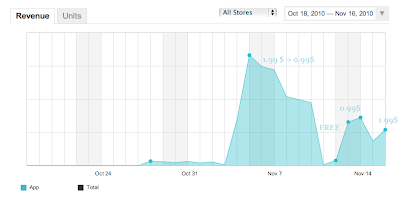
Our game Into The Blue SD was surprisingly featured about two weeks ago. I couldn't believe my eyes when i opened up iTunes and saw the icon on the front page of the AppStore. A few hours later we decided to drop the price to $0.99 in order to get a maximum of sales and reach the highest rank possible.

One day before the feature in New and Noteworthy was about to run out, we decided to take a risk and make it FREE before the weekend.

Why oh why would you do that?

The game had been featured before. The last time our ranks and sales dropped to almost zero in a couple of weeks after the feature ran out. [We think this is due to the fact that Into The Blue is a quite "special" game that doesn't appeal to a wide range of users].
This time we didn't want to say goodbye to the upper ranks so easy. At least not without a fight. If the ranks/sales will drop soon anyway, why not getting the app more known and get some more buzz before going down?!

What we didn't know...

...was that after last Thursday we were still in the last slots of New and Noteworthy AND What's Hot. So the timing for going FREE was not that great after all.

The Positive Effects
  • Going FREE while being featured last Thursday & Friday brought us around 30k free downloads and a way larger user base than we had before (~2k)
  • Our customers who bought the former release could grab the new release for FREE (we want our customers to be happy)
  • Media Buzz: lots of twitter messages, news posts, a review and few more covers and youtube videos
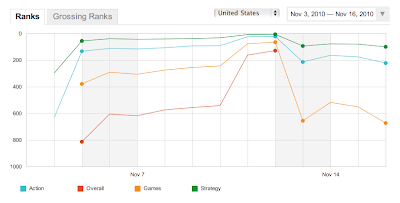
  • Increased visibility due to reasonably high free app ranks (#58 free games, #6 free strategy games in U.S)


The Negative Effects
  • Lost sales (since the game was still featured the next days)
  • Ranks dropped quite a bit
  • Bad ratings due to users who don't like the game/genre anyway


Lesson learned

it's hard to say what would have happened without going FREE. Most likely though we would have been able to keep our rank a bit longer and have a few more days with higher sales.
I conclude that going FREE either makes sense if the ranks are down anyway or if the app gets enough coverage (100k+) by being featured in one of the free-app programs. The latter would definitely increase the chance to get the ranks up again more easily after switching to paid.
But this is probably something that really depends on the game.
I looked up the ranks of about 10 games lately that were featured before by one of the major free app programs. The result was that only one of these games could increase sales/ranking after the free period. So it's probably more about getting a game known than getting more people to buy it.

Pricing

after reading the great post from Matt about pricing today i wanted to say a few words about our recent price changes as well.
Going on SALE for $0.99 definitely helped with the number of sales but i would estimate that it only increased by 15-20%. Making it $1.99 (the introduction price) would have been the more viable revenue option while being featured.
Going on SALE is possibly a question of going to the top or not. And by now we know that ITB is not a game that appeals to everyone - thus we probably could have stayed with the regular price tag ($2.99) and just enjoyed the ride while it lasts ;-)
In the last days we changed from $0.99 to $1.99 again and whilst we have about 25% less sales the revenue is higher.

Lite Version

we also released a lite version for Into The Blue SD a few days ago. Actually i'm not sure if having a LITE version out there does us any good. But more about this in a future post...

Suggested Reading

Wednesday, November 10, 2010

Into The Blue (SD) FREE on Friday!


Now that Into The Blue is back in the AppStore and at the time of writing featured in "New and Noteworthy" we decided to make it FREE this Friday, Nov 12th.

Happy downloading everyone!

http://itunes.apple.com/us/app/into-the-blue-sd/id398897674?mt=8

Wednesday, November 3, 2010

Gem Hunt - our upcoming game for iPhone

I feel that it is finally time to introduce our upcoming game Gem Hunt to you. The idea to make this game came from a little free & casual marketing game called StuderusMatch we developed for a client of us this summer. StuderusMatch resulted in a fun little hiscore game and we really liked the mixture of physics and color matching. So we kept the idea in mind to make a similar game. One day...

The Palm Experience
A few weeks later we got word about the Palm PDK Hot Apps Contest. We decided to participate and chose to go back to the physics and color-match concept with the popular gem theme on top. So we went ahead and put together a playable version in about 2 weeks time. Unfortunately we started about 4 weeks late and the contest was already running. There were multiple prize sections depending on the number of sales. Since all slots in the paid section were taken we participated in the free section.
Being new to the platform and late in the contest we weren't able to win a big prize in the contest. But we still got rank #34 or so with about 15.000 free downloads.
It wasn't quite enough for the 10k$ prize but it showed us that the game had potential and that there are users who like it.
Since we like the game ourselves we thought that it might be great to have this game available for iOS too and started the work about 2 weeks ago. Now we are spinning to take the game further and polish it to make it even better.

The following image shows the game how it is right now. The graphics will probably change until release...


Gameplay
So what do you do in this game? It's quite simple. You have 60 seconds to beat the hiscore. In this time you direct gems in a billiard-like manner. Two gems of the same type match and disappear from the screen. If you match the same color a few times in a row, you are able to score more points. We'll also add more game features and possibly also alternative modes in the next weeks. Some of the features will be available in an IAP shop whilst others will be available to start with. I will write more about the game and features in the next blog posts.

Beta-Testing
Although we haven't really started beta testing, it would be great to get some feedback on the game early. If you like to give it a go let me know on twitter. Thanks!

Monday, October 25, 2010

Into The Blue (SD) Re-Released


After a few weeks of being offline, our game Into The Blue is now back in the AppStore!
We recently moved from a company to a common developer account. Unfortunately in this situation apple's system doesn't support moving applications across just yet. That's why we had to pull Into The Blue from the store and resubmit it using the new account.

SD vs. HD
Why is it named SD now? Simply because we weren't able to submit the game with the same name since the old version is appearently still in apple's system. Also chances are good that after we have finished working on our current project Gem Hunt (will blog about it soon) we'll find time for an HD version for Into The Blue.

While we had to resubmit anyway, we now added PlayHaven support to it and updated OpenFeint. We'll be also looking into releasing the LITE version soon with the new account.

Wednesday, October 13, 2010

Latest Proceedings: JSPortal.app, gh-unit and drilldown UIPickerView

Todays post is a about where i'm at with my current iPhone project and what i've been up to tech-wise.

My current project: JSPortal(.app)
I'm currently working on an iPhone App for a friend's WebApp called JSPortal.
I don't want to go into too much detail in this post but let me at least tell you that it is a quite cool time- and budget tracking software. It's also free of charge for up to 3 users. If you are looking for something to keep track of your development projects you should check it out.
Joost did a great job in providing a demo mode that let's you demo the WebApp right away. No signup, no email verification. Peace of mind.
The first version of the iPhone App is going to help JSPortal's users assigning work time to projects.
Since last week i made a lot of progress and hope i can finish it in time. This would be the 29th of October. Let's see if i can make it.


Unit Testing with gh-unit
Back in my Java days i wrote a lot of automated unit tests with JUnit. Since i started making my first iPhone game i've become a bit somewhat slack and didn't do much testing. Last week i finally started looking into testing again. At first i looked into OCUnit which i understand is shipped with XCode. It runs the tests during the build and you can see the results in the build view. I see that running them together with the build has its advantages. Such as having your build simply fail when there are tests not running. But here's the thing, i'm a very graphics oriented person and i only want to look into my tests when i'm running them. I want to see green and red bars. That's it. The gh-unit project runs its tests seperately from the build. The iPhone version of gh-unit runs the tests within an own iPhone AppDelegate which gives you also the opportunity to test aspects of your view as well. The only issue is that it also misses my beloved green and red bars. So i went a head and forked the gh-unit project and implemented them.
I feel that the table-view with these rather big bars and labels works well for a limited number of tests. For bigger projects smaller rows might be better. I can also see a custom view with lots of little squares for each test-method. That way you might not see which method in detail failed but you'll have a better overview over which suites/classes passed.


Drilldown UIPickerView Component
I still consider myself more of a freshman in the UIKit area but i also feel like my understanding is growing a bit every day i work with it. Today i was able to create a UIPickerView component that supports nested elements. It has some really hacky bits in it (the code, not the view) but it works well. It is also reusable because it gets its row items from a delegate. If someone is interested in the sourcecode, let me know.

Friday, October 8, 2010

Getting better at XCode

Yesterday i felt it was time to revisit the way i use XCode (3.2.4) and see if i can find some useful functionality that i can use more often. I also had a look at shortcuts and either created some that were missing or changed the ones that are hard to remember or simply hard to use for my taste.
Update: added sections Warnings, Split-Screen Editing, -(id) init {... and Recommended Reading [10/14/10]

File > Open Quickly... ⇧⌘D
This is probably the coolest feature i just haven't used yet. Instead of looking in the sidebar for your file and eventually clicking it, Open Quickly... opens up a little dialog window and shows matching files or methods as you type. I also realized that it captures your currently selected text.


Edit > Refactor...
[1]


I used the Refactor > Rename functionality occasionally but always had the impression that i'm waiting longer for it to finish as i would need changing the names by hand. But if you uncheck the Snapshot option it's actually quite fast so there's no excuse not to use it. I'm also going to use at least the option Extract from now on to extract lines of code to a new method if it makes sense.
Note: Please uncheck the Snapshot option at your own risk.

Edit > Completion List [2]
I probably never used this function a lot because my fingers aren't used to use any shortcuts containing Escape. I always used Next Completion instead but sometimes you aren't even sure about the first letter the function you need starts with so that's where Completion List is for.

Edit > Format > Re-Indent [3]
I realized that i'm re-indenting a lot by hand by throwing tabs and spaces at lines. This is stupid. Re-Indent can be used on a selection or on the current line. It also seems that ^I triggers Indent-Line.

Build > Clean ⇧⌘K
I actually never used this before... ok just kidding - but i always used the mouse to do this. The shortcut isn't that hard so i'll try to use that from now on.

Build > Build and Analyze ⇧⌘A

This is a somewhat useful thing to check on your alloc-fu. The clang analyzer will go through your code and will notice for instance that you don't release that object you created without autorelease.
There's also a target setting called "Run Static Analyzer" to run analyze automatically. Although it's a great way to keep writing alloc-sane code it slows down build time which is why i turned it off again.
Note: as suggested here i had to add -D__IPHONE_OS_VERSION_MIN_REQUIRED=040100
to Other-C-Flags in my project settings so that the analyzer works with my current XCode settings. Might be a specific problem related to 3.2.4.


Help > Quickhelp [4]
Wow i really feel stupid not to have used this function before. For example if you select a method name and execute Quickhelp it will show you a little help window with some documentation if available.

iPhone Simulator Window Scale Shortcuts
To change the iPhone Simulator's window size it seems you have to do it with the mouse curson in the menubar since there's no shortcut for it. I had a look at the XCode shortcuts but didn't find any setting for this.
So my solution was to create a shortcut under System Preferences > Keyboard.
Simply add an Application Shortcut for 50% and 100% and you are done.


Warnings
in the past weeks i noticed that i tend to care more about warnings. If you want to always see your warnings (they usually hide after you run the build a second time) just switch to the tab "All Results" in the "Build Results" Window.

Split-Screen Editing
Today i found out in the article mentioned below how to edit multiple files in one window.
There are two little icons on the right edge of the window above the scrollbar to add another window vertically or horizontally.

- (id) init { ...
If you are as lazy as i am and you didn't put a default init macro in your obj-c template file you can also insert a full init statement manually by using Edit > Insert Text Macro > Objective-C > init Definition. Shortcuts can be added via XCode Preferences.

Recommended Reading:
14 Essential Xcode Tips, Tricks and Resources for iPhone Devs by Dan Grigsby

[1] I assigned the shortcut ^R to it since i'm not going to use whatever ^R is usually doing.
[2] I assigned ^SPACE to it since that is close to the shortcut i know from eclipse.
[3] I assigned ⌥
⌘I for this.
[4] I didn't like the shortcut and now assigned ^H to it.

Sunday, September 26, 2010

Using UITableViewController #1: Swipe to Delete

This article among other articles about iOS development can be found on my new blog.


this is just a quick tutorial for those like me who didn't implement this before. Luckily this is one of the nice UI features that can be implemented without much hassle.

You only have to do a few things to get this working.

1) Tell your UITableViewDelegate that your rows have a delete editing style:


- (UITableViewCellEditingStyle) tableView:(UITableView*)tableView editingStyleForRowAtIndexPath:(NSIndexPath*)indexPath {
return UITableViewCellEditingStyleDelete;
}


2) Implement commitEditingStyle: in your UITableViewDataSource. In order to get the delete button displayed it is enough to just have the function implemented without doing anything:


- (void)tableView:(UITableView*)tableView commitEditingStyle:(UITableViewCellEditingStyle)editingStyle forRowAtIndexPath:(NSIndexPath*)indexPath {
// delete your data for this row from here
}


3) Now if you actually want to delete that row visually you have to add more to commitEditingStyle. And before you do that visual delete, you have to change your data beforehand so that
numberOfRowsInSection: returns less rows than before:


- (NSInteger)tableView:(UITableView*)aTableView numberOfRowsInSection:(NSInteger)section {
return numRows;
}

- (void)tableView:(UITableView *)tableView commitEditingStyle:(UITableViewCellEditingStyle)editingStyle forRowAtIndexPath:(NSIndexPath*)indexPath {
numRows--;
[self.tableView deleteRowsAtIndexPaths:[NSArray arrayWithObject:indexPath] withRowAnimation:UITableViewRowAnimationFade];
}


And that's it!

Sunday, September 12, 2010

Simple but nice

Todays post tells a story that follows the lead of the last post on my path to more simplicity in the games i create.

The Story
Once a year or so i meet with a friend in the evening and do some painting. Everytime i paint, i try to paint something with a lot of detail. Usually the result is mediocre. The detail i want to achieve doesn't come out right or i don't have enough time/patience to finish it. In the end i'm just unhappy and have the feeling that i wasted my time. (It takes about a year to recover from this evening and try again.)

Yesterday i bought some ultra widescreen canvases with my girlfriend and instead of going for something detailed again i chose to just paint something simple but nice.

I love gradients so i chose to stick to that and imagined just horizontal stripes in black, a blue gradient, black again and red/orangy gradients.
Since i try to be a good indie citizen i started with a prototype.
I painted the gradients quickly on A5 format to see if i would actually like it. And i did. I asked myself if i should make another prototype which is even better but in the end of the evening i wanted to have a finished painting - not just prototypes. So i went ahead and painted the canvas and was finished by end of the evening. And here it is:


The Result

I must say i'm really pleased with the results. Probably because A) i'm not an artist and B) my former paintings were crap . What strikes me is that even though i worked fewer hours on it - and it doesn't have the complexity of my former paintings - it has much more to it. Let me stress that i'm not saying "this is an amazing painting" - i just say that i finished something in the time i had and i'm happy with the results and especially with the process of painting something i like in one evening.


Walter: “The beauty of this is its simplicity."


Conclusion

Painting is not game design. They are two different things and can't be compared that easily. But if i would draw the line to game design, i experienced a lot of the benefits i discussed in my earlier blog post. Due to the simplicity of the idea i could prototype it quickly and then execute it in the time i had. I even had plenty of time in the end to fix and polish a few things.
If my painting was an iPhone app, i probably would give it away for free since it is a bit too simplistic. But in the end i achieved something and feel that it is easier to build on top of that experience to make something slightly more complex next time.

To end this post i'd like to add a quote from an interview with Adam Saltsman i read a few days ago since i feel it fits well to this (and the last) post:

What do you contribute to your success as an independent game developer and what advice do you have for others who want to live the dream?
Make small games! Make little polished demos or prototypes and share them with everybody. This is not necessarily the route to financial success but in my experience it is the best and fastest way to learn how to design games. I’ve made maybe a dozen or so 1-week games and I’m just beginning to feel really comfortable with my design process.

Friday, September 3, 2010

Why developing smaller games is great

A few days ago I read about "Size Doesn’t Matter" in the #idevblogaday blog roll. Since i feel infected by the idea of small scope games at the moment i'd like to share my thoughts on why it can be a great catch for indie developers - especially newcomers like me. This is my first article on indie (iPhone) game development so please bear with me here ;-).


We all know that developing small games usually takes less time than bigger ones and that there are plenty games out there that work great with just little scope. I asked myself what benefits there actually are to develop smaller games.
This is what i came up with:

  1. Be more creative and have more fun creating games.
    If you have worked on a lengthy title before, you know what i mean, it just gets less fun the longer you work on it. With smaller games you still have to do your polish work but you'll be working on the next title or prototype sooner than later.

  2. Release more.
    Releasing a new title brings that great feeling with it. You put it out there, people are playing it and you get some feedback for you work and feel that you accomplished something. Working on small titles willl give you that feeling more often because you'll just release more often.

  3. Quicker Prototyping.
    This might not be true for every concept but usually if you have a smaller game you should be able to prototype it quicker because there are less questions that need be answered.

  4. Good for your wallet.
    Since it takes less time to create that game you can keep the costs low. Less designer work, less sound work or purchases, less development, less testing, less concept work, less changes, less ...

  5. Better Cross-Promotion.
    By having more but smaller titles you have more power to cross promote your own games
    and have one of your games free for a while. In my opinion NimbleBit shows this in perfection.

  6. Faster Feedback.
    If you are a newcomer or new to a certain game genre it's good to get some feedback if you are on the right track. My first title took 5 months to release and all that happened was that i learned about 4 months too late what went right and what wrong. Although the game turned out well, the time i spent on the game didn't get into my pockets just yet. After all i rather would have created two or even three games in that time.

  7. Day-Job Compatibility.
    Another reason for smaller games is that it works better with your dayjob. With a bigger project you might get into a state where you just feel it's dragging on and will probably never finish. And you might be right, you might just not have the time or patience to finish it. Think smaller.

  8. Make it shiny.
    With less content that needs to be in the game you'll have more time (and patience) to polish your game and make it a better user experience as you would be able to working on a larger game.

  9. Easier to grasp.
    By having a smaller game with less content you're likely to have less that needs explaining. The game will be easier to grasp and might not need any explanation at all.

  10. Better for your nerves.
    Since you have a smaller scope, there's less to worry about and your game has should have less bugs. Also it might be easier to test. Less testing and bugfixing is not only time-saving, it also doesn't interfere as much with the work you actually wanted to get done and leaves you in a happier state of mind.

Despite all the advantages of smaller games i still don't think it's that easy to make a well working game with just little content. If the idea isn't good enough it won't stand all that cutting away of features. In the end it might just miss that extra mode or a bunch of levels to make it work.